

When most business owners think about cybersecurity, they think about preventing somebody from getting into their systems. They want a good firewall, antivirus software, email protection, and whatever else their IT company recommends to keep the bad guys out. Those are all important, but preventing attacks is only one part of cybersecurity. You can spend a lot of money trying to keep attackers out and still be poorly prepared when something goes wrong.
One of the ways we explain cybersecurity to our clients is through something called the Cyber Defense Matrix. We use it because cybersecurity is a complicated subject, and most business owners don’t have the time or interest to learn all the technical details. They shouldn’t have to. But they do need a way to understand whether their organization has a comprehensive cybersecurity plan and how to decide which improvements should come first.
The matrix looks at five things you need to do: Identify, Protect, Detect, Respond, and Recover. It then applies those five activities to five types of assets: devices, applications, networks, data, and users. That creates 25 areas to consider when evaluating your cybersecurity.
Now, 25 areas might sound like a lot, but don’t let that overwhelm you. If you take a moment to think about it, the approach actually makes a lot of sense. You need to know what devices you have, protect them, recognize when something is wrong, respond when there’s a problem, and be able to recover. The same basic thinking applies to your applications, networks, data, and users. You don’t need to know how to accomplish all of those things technically, but you should have some sense of how well they’re being handled.
And if you have absolutely no idea how your organization is doing in those areas, I think your IT company could be doing a much better job educating you.
Think about it this way. Even if you’re a doctor who spends most of the day seeing patients, if you own the practice, you still have to run the business. You don’t need to be a financial specialist to understand a P&L or a balance sheet. But you should understand enough to know how the business is performing and recognize when something needs attention. Cybersecurity is no different. You don’t need to become a cybersecurity expert, but you should understand the fundamentals well enough to make informed decisions about protecting your practice.
At Strive, we use both the CIS Controls and HIPAA requirements to guide the technical implementation of cybersecurity for our healthcare clients. Those are important standards and requirements, but they’re not necessarily the best way to explain cybersecurity to a practice owner. We find the Cyber Defense Matrix much more useful for that conversation because it helps people understand the overall strategy, see where they have good coverage, and identify areas that need improvement.
The objective isn’t to fill all 25 boxes with expensive security products. It’s to understand where you stand, make sure the important risks are being addressed, and prioritize improvements based on what matters most to your practice.
1. Understand the Cyber Defense Matrix Before You Start Buying Security Products
The Cyber Defense Matrix was developed by cybersecurity expert Sounil Yu. It provides a way to organize cybersecurity into five functions across five types of assets.
The five functions are fairly straightforward:
- Identify: Know what you have and what needs to be protected.
- Protect: Put safeguards in place to reduce the chances of something going wrong.
- Detect: Recognize when suspicious activity or a security problem occurs.
- Respond: Take appropriate action when something happens.
- Recover: Restore systems, information, and operations afterward.
The five asset categories are equally straightforward:
- Devices: Computers, servers, and other equipment.
- Applications: The software your practice uses, including your EHR and business applications.
- Networks: The connections and infrastructure your systems rely on, including office networks, cloud platforms, remote access, and employees’ home networks.
- Data: Patient information, business records, and other important information.
- Users: The people who access your systems and the accounts they use.
When you put those together, you get a matrix with 25 intersections. Each intersection represents an area you should consider when evaluating your cybersecurity.
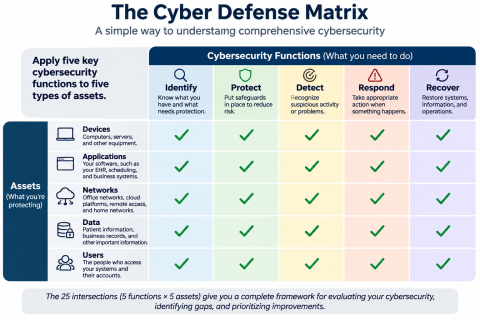
The checkmarks represent areas to evaluate, not confirmation that security protections are already in place.
It’s important to understand that this isn’t a list of 25 products you need to buy. Some tools and processes address several areas at once, and some areas are handled primarily through policies, procedures, or the way your IT company manages your environment.
The matrix simply gives you a way to make sure you’re looking at the whole picture instead of concentrating all your attention and budget on one part of cybersecurity.
2. Walk Through One Example: The Computers in Your Practice
Let’s use the computers in your practice as an example, because they’re something every practice owner understands. You don’t need to know how cybersecurity software works to follow the logic.
Identify: First, you need to know what computers you have. How many are there? Where are they? Who uses them? Are they all being managed by your IT company? If you don’t have an accurate inventory, how can you be confident that every computer is being protected?
Protect: Once you know what computers you have, you need to protect them. That might involve security software, keeping operating systems updated, limiting unnecessary access, and configuring computers according to consistent standards. This is the area most people think about when they hear the word cybersecurity.
Detect: Even with good protection, something can still go wrong. You need a way to recognize suspicious activity, such as a computer behaving in a way that suggests it may have been compromised. Just having security software installed isn’t enough if nobody is paying attention to what it’s reporting.
Respond: If a computer is compromised, what happens next? Somebody needs to investigate, determine the extent of the problem, and take appropriate action. That might include isolating the computer from the network while the issue is addressed. Your practice should know who is responsible for making those decisions and carrying them out.
Recover: Finally, you need to get back to normal. Depending on what happened, that might mean rebuilding the computer, restoring information, reinstalling applications, or replacing equipment. The goal is to restore the computer to a trustworthy working condition without creating additional problems for the practice.
When you look at cybersecurity this way, it becomes easier to understand why antivirus software by itself isn’t a complete solution. Antivirus may help with protection and detection, but it doesn’t automatically give you an accurate inventory, an incident response process, or a reliable way to recover.
And that’s just one row of the matrix.
3. Apply the Same Thinking to Applications, Networks, Data, and Users
Once you understand the computer example, the other four asset categories become much easier to think about. You don’t have to work through every technical detail. You’re simply asking whether your organization has a reasonable plan for each of the five functions.
Applications
Your practice probably relies on several applications, including an EHR, scheduling software, imaging systems, billing applications, and email. You need to know what applications you’re using, protect access to them, recognize suspicious activity, respond when there’s a problem, and understand how operations would be restored if an important application became unavailable.
One thing that’s particularly important in healthcare is understanding where your IT company’s responsibility ends and another vendor’s responsibility begins. Your EHR provider may manage some aspects of security and recovery, while your IT company handles others. That’s fine, as long as those responsibilities are understood and there aren’t important gaps between them.
Networks
Your network includes more than the equipment and connections inside your office. You also need to consider cloud platforms, remote access, and the home networks employees use when they work outside the practice. Your IT company should understand how these different environments connect, what information travels between them, and where your organization may be exposed to risk.
For example, you might have employees accessing your EHR or Microsoft 365 from home, vendors connecting remotely to support clinical equipment, and cloud applications exchanging information with systems in your office. You need to understand which connections exist, how they’re protected, how suspicious activity would be detected, and what would happen if one of those connections or environments were compromised.
You won’t necessarily have direct control over every network involved, particularly an employee’s home network or a cloud provider’s infrastructure. But that doesn’t mean you can ignore the risks. Your IT company should help you understand what you can control, what protections are available, and where responsibility belongs to another provider or the employee.
Data
For a healthcare practice, data is especially important because it includes patient information as well as the business records needed to operate the practice. You need to know where that information lives, who can access it, how it’s protected, how you would recognize inappropriate access or loss, what happens if an incident occurs, and how information can be recovered.
This is also where it’s important to understand your backup arrangements. Just because an application is hosted in the cloud doesn’t necessarily mean your IT company is backing up the information inside it. Different systems may have different recovery responsibilities, and those need to be clear.
Users
Finally, you have the people who use your systems. You need to know who has access, make sure that access is appropriate, recognize suspicious account activity, respond when an account may be compromised, and restore legitimate access safely after an incident.
This includes things like multifactor authentication, employee onboarding and offboarding, access reviews, and security awareness training. It also means employees need to know whom to contact if they receive a suspicious email or think something may have gone wrong.
The details are different for each asset category, but the questions are essentially the same. Once you understand that, the matrix stops looking like 25 unrelated cybersecurity problems and starts looking like a sensible way to organize a complicated subject.
4. Use the Matrix to Identify Gaps and Prioritize Improvements
Now that you understand the matrix, the next question is what to do with it. I wouldn’t recommend that a practice owner try to evaluate every security control personally. That’s your IT company’s job. What I would recommend is asking your IT company to help you understand where your organization stands across the matrix.
You don’t necessarily need a detailed technical report. A simple overview showing which areas are well covered, which need improvement, and which haven’t been adequately addressed can be a good starting point.
For example, you might discover that your practice has invested heavily in tools designed to prevent attacks but hasn’t spent much time planning how to respond to a security incident. Or you might have good backups for your local server but no clear understanding of how important cloud applications would be recovered.
Those are exactly the kinds of gaps the matrix can help reveal.
Not Every Gap Has the Same Priority
The goal isn’t to make every box perfect before moving on. Cybersecurity is an ongoing process, and there will always be things that can be improved.
Instead, you and your IT company need to prioritize based on the risks to your practice.
I’d look at several factors when deciding what comes first:
- Business impact: What happens to patient care or practice operations if this system becomes unavailable or information is compromised?
- Likelihood: How realistic is the threat we’re trying to address?
- Current exposure: Do we already have reasonable protections, or is there a significant gap?
- Cost and effort: What would it take to make the improvement, and how much risk would it reduce?
- Regulatory requirements: Are there HIPAA obligations or other requirements that affect what needs to be addressed?
For example, if your practice doesn’t have multifactor authentication protecting important accounts, that may deserve attention before purchasing another security product that overlaps with something you already own. If your backups have never been tested, confirming that you can recover critical systems may be more valuable than adding another layer of prevention.
The right priorities will depend on your environment. What’s important is that the decisions are being made deliberately, with an understanding of the risks and the resources available.
This Is Where Your IT Company Should Be Helping You
I think this is an important part of what a good IT provider should do. It’s not enough to identify problems and send the client a list of things to buy. Your provider should help you understand which problems matter most, what the available options are, and what makes sense to address now versus later.
At Strive, we use the CIS Controls and HIPAA requirements to guide the technical implementation of cybersecurity for healthcare clients. We also use our technology standards, proactive management processes, and planning conversations to help clients make decisions about their environments. Our 391-point StriveInspect process is part of how we evaluate technical environments and identify issues that need attention, although it isn’t a comprehensive HIPAA compliance assessment.
When we’re discussing cybersecurity with a practice owner, the Cyber Defense Matrix helps us explain how the recommendations fit into the overall strategy. It makes it easier to understand why we might recommend an improvement in detection, response, or recovery instead of simply adding another tool intended to keep attackers out.
5. Make Sure Your Cybersecurity Plan Is Being Managed Over Time
One of the mistakes organizations make is treating cybersecurity as a project with a finish line. They purchase the recommended tools, make some configuration changes, and assume the work is complete. Unfortunately, cybersecurity doesn’t work that way.
Your environment is constantly changing. Employees join and leave, software gets updated, new vulnerabilities are discovered, and equipment gets replaced. Your practice may add a new location, introduce another application, or change the way employees access information. Each of those changes can affect your cybersecurity.
That’s why the matrix should be something you revisit periodically, not something you fill out once and put in a drawer.
You don’t need to review all 25 areas at every meeting. But your IT company should be monitoring the environment, addressing important issues, and helping you understand how your security posture is changing over time. If new risks are identified, they should be explained and prioritized. If you’ve made improvements, you should understand what those improvements accomplished.
Cybersecurity and HIPAA Compliance Are Related, but They’re Not the Same Thing
For healthcare practices, there’s another important consideration. A comprehensive cybersecurity plan supports HIPAA compliance, but it doesn’t automatically mean your organization has addressed all of its HIPAA responsibilities.
HIPAA also involves administrative and privacy requirements, documented policies and procedures, employee training, business associate relationships, risk assessments, incident management, and ongoing documentation. Some of those responsibilities involve technology, while others require active participation from practice leadership and employees.
At Strive, we offer a comprehensive HIPAA compliance program as a separate service from our standard managed IT offering. That program addresses the broader security, privacy, and administrative requirements, including ongoing guidance and compliance management. It’s important to understand that managing your technology and cybersecurity tools doesn’t automatically mean every HIPAA requirement is being handled.
The Cyber Defense Matrix is useful for understanding your cybersecurity coverage, but it isn’t a substitute for a HIPAA compliance program.
Five Questions to Ask Your IT Company About Your Cybersecurity Plan
If you’re a healthcare practice owner and you’re not sure how comprehensive your cybersecurity plan is, I’d start with five questions:
- Can you show me how our cybersecurity plan addresses Identify, Protect, Detect, Respond, and Recover?
- Are we considering all five asset categories: devices, applications, networks, data, and users?
- Where are our biggest gaps, and what risks do those gaps create for the practice?
- Which improvements should we prioritize, and why?
- How are you reviewing and updating the plan as our technology and business change?
You don’t need a detailed technical answer to every question. What you should expect is a conversation that helps you understand where things stand and what needs attention.
If your IT company can explain the plan, identify the important gaps, and help you make sensible decisions about priorities, that’s a good sign. If all they can do is give you a list of security products, I’d want a better explanation.
You Don’t Need to Be a Cybersecurity Expert to Be Responsible for Cybersecurity
If you own a healthcare practice, you’re responsible for a lot of things that you don’t personally handle. You rely on accountants, attorneys, clinical specialists, and other professionals to help you make good decisions. You don’t need to become an expert in every one of those areas, but you do need enough understanding to recognize what’s important and ask the right questions.
Cybersecurity should be no different.
The Cyber Defense Matrix gives you a practical way to think about a complicated subject. It helps you see that cybersecurity involves more than keeping attackers out, that you need to consider different types of assets, and that a comprehensive plan requires ongoing attention. Most importantly, it gives you a way to have a meaningful conversation with your IT company about where you’re protected, where you have gaps, and what you should do next.
We’ve been helping organizations across Boulder, Denver, Fort Collins, and Colorado’s Northern Front Range manage their technology since 2006. At Strive, we believe part of our job is making sure our clients understand the decisions they’re being asked to make, rather than expecting them to approve recommendations they don’t understand.
If you’d like help evaluating your healthcare practice’s cybersecurity plan, we’re happy to have that conversation.
Contact Strive IT to discuss your cybersecurity plan.
For more on what your IT provider should be responsible for, see our article: What Should Be Included in a Managed IT Services Agreement for a Healthcare Practice?