
 Contact Us At
 The invisible problem that's quietly costing your business time, money, and customers — and what you can do about it.
You've paid for a fast internet connection. You have a decent router. So why does everything grind to a halt when the whole team is in the office? The culprit is almost certainly Wi-Fi congestion — and it's far more common than most business owners realise.
Think of your Wi-Fi signal like a single-lane road. When there's only one car on it, everything moves freely. But during rush hour, with dozens of vehicles trying to get through at once, everyone slows to a crawl — even though the road itself hasn't changed. That's congestion, and your wireless network works in exactly the same way.
The "Taking Turns" Problem
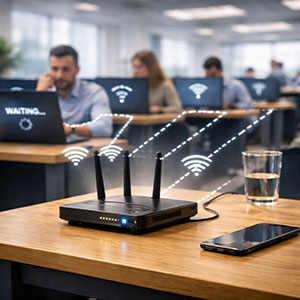
Here's something most people don't know: Wi-Fi is a shared medium. Unlike a wired network, where each device gets its own dedicated lane, every wireless device on your network has to take turns using the same airspace. Your router acts like a traffic controller, rapidly switching between devices — but it can only talk to one at a time.
There's another layer to this too. Wi-Fi is what's known as half duplex — meaning it can only send or receive data at any given moment, never both simultaneously. Think of it like a walkie-talkie: one person talks, the other listens, then they swap. A wired connection, by contrast, is full duplex — it can send and receive at the same time, like a normal phone call. In practice, this means that every time your laptop uploads something (sending an email attachment, backing up to the cloud, making a video call), it briefly stops receiving — and every other device on the network is affected by that back-and-forth. The more devices doing this simultaneously, the more the whole network stutters.
When you have a handful of devices, the wait is so brief you never notice it. But add up the laptops, phones, tablets, smart TVs, printers, security cameras, and the personal devices your staff bring in, and suddenly you might have 40 or 50 devices all competing for their turn. Each one waits longer. Speeds drop. Frustration rises.
Your Neighbors Are Part of the Problem
If you're in a shared building — an office block, a retail strip, a serviced workspace — your Wi-Fi doesn't just compete with your own devices. It competes with every other business on the floor. Wi-Fi signals pass straight through walls, and when multiple networks broadcast on the same channel, they interfere with each other the way two radio stations broadcasting on the same frequency would.
This is especially common on the older 2.4 GHz band, which only has three non-overlapping channels available. In a busy building, all of them may already be in heavy use before you've even switched on your router.
Speed Limits Nobody Told You About
Even the devices you own can work against you. Older laptops, some smart devices, and budget phones connect at much slower wireless speeds than modern hardware. Because the router has to slow down to communicate reliably with these older devices, it ends up using more of that shared airtime for them — leaving less for everyone else. It's the wireless equivalent of a slow lorry on a motorway holding up the whole lane.
What It Actually Costs Your Business
Slow Wi-Fi isn't just annoying. It has real business consequences. Video calls freeze mid-presentation with a client. Cloud-based tools like accounting software or stock management systems time out at critical moments. Card payment terminals hesitate. Staff spend time reloading pages instead of doing their jobs. And if customers rely on your guest Wi-Fi, a poor experience reflects directly on your brand.
Studies consistently show that employees can lose 30 minutes or more per day to slow or unreliable technology. Across a team of ten, that's five hours of lost productivity every single day.
The Simplest Fix Most Businesses Overlook: Plug In
Before looking at any wireless solution, it's worth asking a straightforward question: does every desk actually need Wi-Fi?
A wired ethernet connection — the cable that plugs directly into your computer — is faster, more reliable, and significantly more secure than any wireless connection. It doesn't suffer from interference, it doesn't share airtime with anyone, and it can't be accessed by someone sitting in the car park trying to sniff your traffic. For staff who spend most of their day at a desk, a cable is simply the better tool for the job, and it immediately reduces congestion on the wireless network for everyone else. The good news is you don't have to choose one or the other — staff can plug in at their desk for the bulk of the day and switch to Wi-Fi when they need to move around. It's a small habit change that makes a noticeable difference.
What Else Can Be Done
For devices that genuinely need to be wireless, there are still good options. Moving them to the 5 GHz band is often the quickest win — it has far more channels available and much less interference from neighbouring businesses, though it has a slightly shorter range. For larger premises, a properly designed mesh network or a system of access points can ensure every corner of the building gets a strong, clean signal rather than relying on a single router to do all the work.
Setting up a separate network for guests and staff is another important step — it keeps personal devices and customer phones from competing with your business-critical systems, and it's an important security measure too. And scheduling large downloads and software updates for overnight or off-peak hours means routine maintenance doesn't choke your network during the working day.
Signs Your Business Has a Congestion Problem
- Speeds feel fine in the morning but deteriorate once everyone arrives
- Video calls drop or pixelate during busy periods
- Some areas of the office have noticeably worse signal than others
- Rebooting the router seems to help temporarily, but the problem returns
- Wired connections feel significantly faster than wireless ones
The key takeaway is this: your internet speed and your Wi-Fi performance are two different things. You might be paying for a fast connection that your wireless network is simply unable to deliver. A professional network assessment can identify exactly where the bottlenecks are and give you a clear, plain-English plan — rather than leaving you crossing your fingers and rebooting the router every morning.
Think your network might be holding you back? We offer a free health check for local small businesses — no jargon, no obligation. Get in touch today.